
AI & Automation
From contact form to follow-up: planning an inquiry workflow
Map an inquiry workflow from form submission to human review, with source records, duplicate handling and clear follow-up ownership.
A form submission is the beginning
Receiving an email confirms delivery, but it does not establish who will act on the inquiry. A useful intake process connects receipt, review and a next action. Before adding automation, decide where the source record belongs and who is responsible for it.
For a small team, that might be a reviewed list rather than a complex CRM. The important question is whether a request can disappear between the form and the person expected to respond.
Preserve what the prospect actually said
Keep the submitted message separate from a summary or suggested service category. An empty budget field means the budget is unknown. It does not mean there is no limit. A mention of future merchandise does not automatically authorize production work.
A prepared record can distinguish supplied facts, missing details and questions for clarification. If two people give conflicting instructions, flag the conflict instead of choosing a winner.
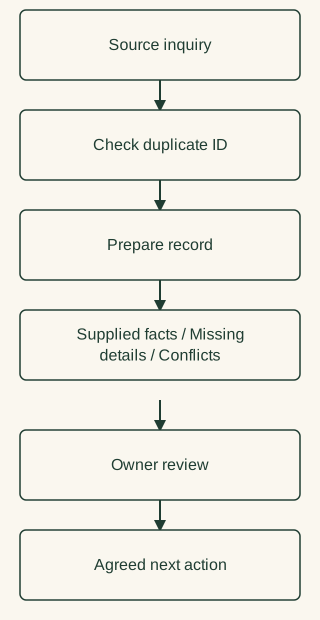
Source inquiry → Check duplicate ID → Prepare record → Owner review → Agreed next action; below Prepare record: Supplied facts / Missing details / Conflicts
Handle repeats and failures deliberately
Use a stable submission identifier when available. A repeated notification should not create a second engagement. Record the last successful check and its coverage; a failed check cannot establish that there were no new inquiries.
Separate known tests from genuine prospects. Test requests are useful for checking the route, but should not inflate lead counts or trigger client communications.
Keep the first action reviewable
An initial workflow can prepare an owner summary and a suggested question list without sending a reply. Later integrations require their own access, testing and responsibility decisions.
On MarketMerit's own launch, a synthetic inquiry was checked through to the business mailbox. That demonstrated that route at that time; it did not prove a fully automated sales process. Our creation story shows the wider launch context.